Content of this topic
Relations are used in plusmeta to connect properties to objects and projects or to each other. Relations themselves are properties that get extra functionality due to their Relation data type.
Uses of relations
Depending on what the relation connects, it has multiple use cases:
- Connect properties to each other to use a mapping, for example
- Connect properties to objects to assign metadata, for example.
- Connect objects to projects to add documents to a project, for example.
Knowledge graph
Due to the many relations in plusmeta, a knowledge graph is created in the background. A fraction of this can be seen in the following example:

Dialogue: Relations
In the Relations dialogue, you can add and remove relations. In addition, a view is integrated in this dialogue on the left side, which visualizes the relations of the property. You can find the dialogue in the Properties view via the button, in the row of the respective property. If necessary, you must first display the Relations column in the table view.
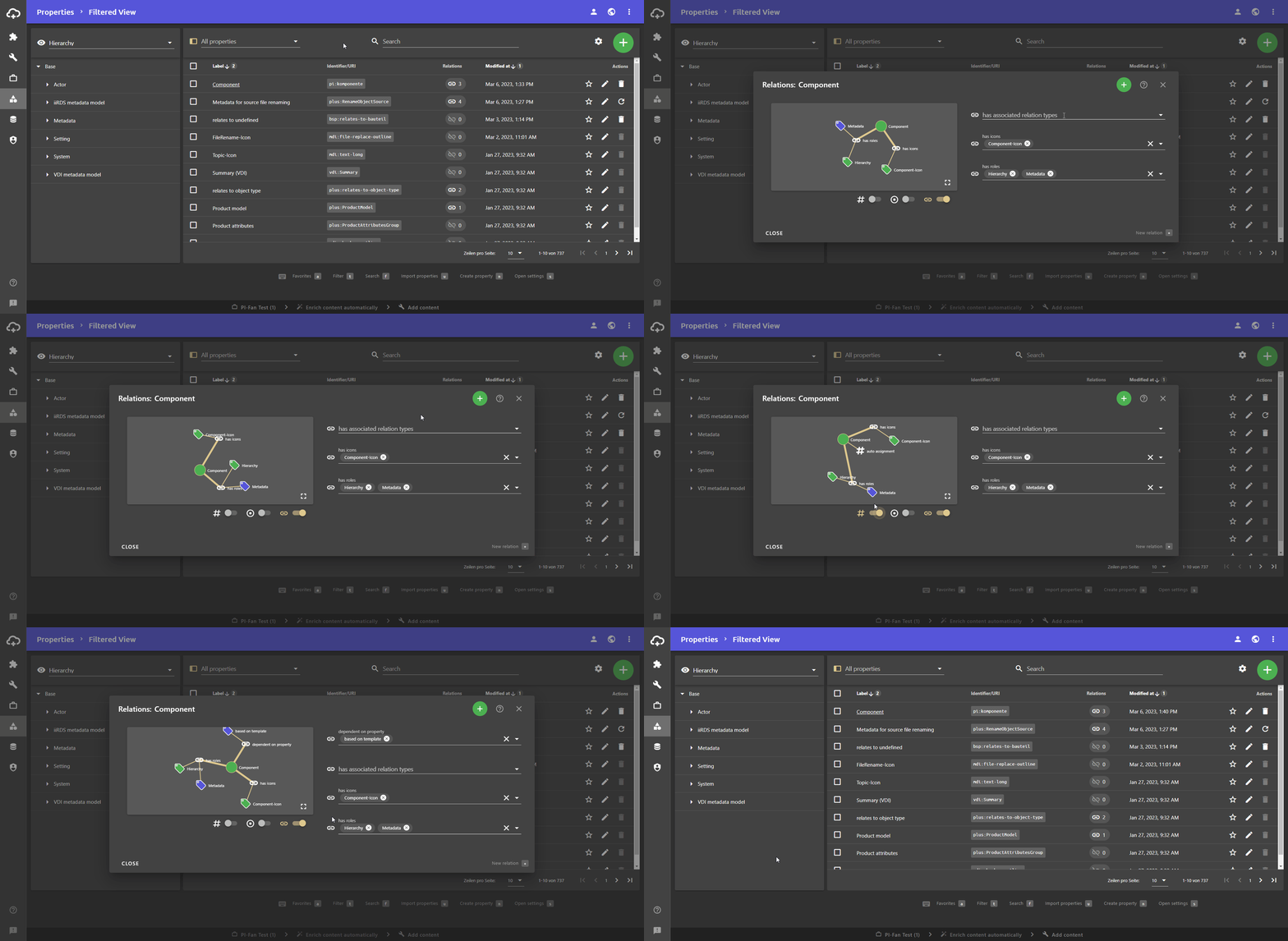
- You can add more relations using the button at the top right of the dialogue. If the button is grayed out, there is no suitable relation.
- The drop-down lists of each relation can be used to add and delete realtion targets. If you delete all values, the relation is also removed. It can be added again using the button.
- The visualization of the relations on the left side can be moved with the mouse pointer. You can use the three toggles below to show and hide attributes, indicators and relations. By default, only relations are displayed.
