Content of this topic
Projects
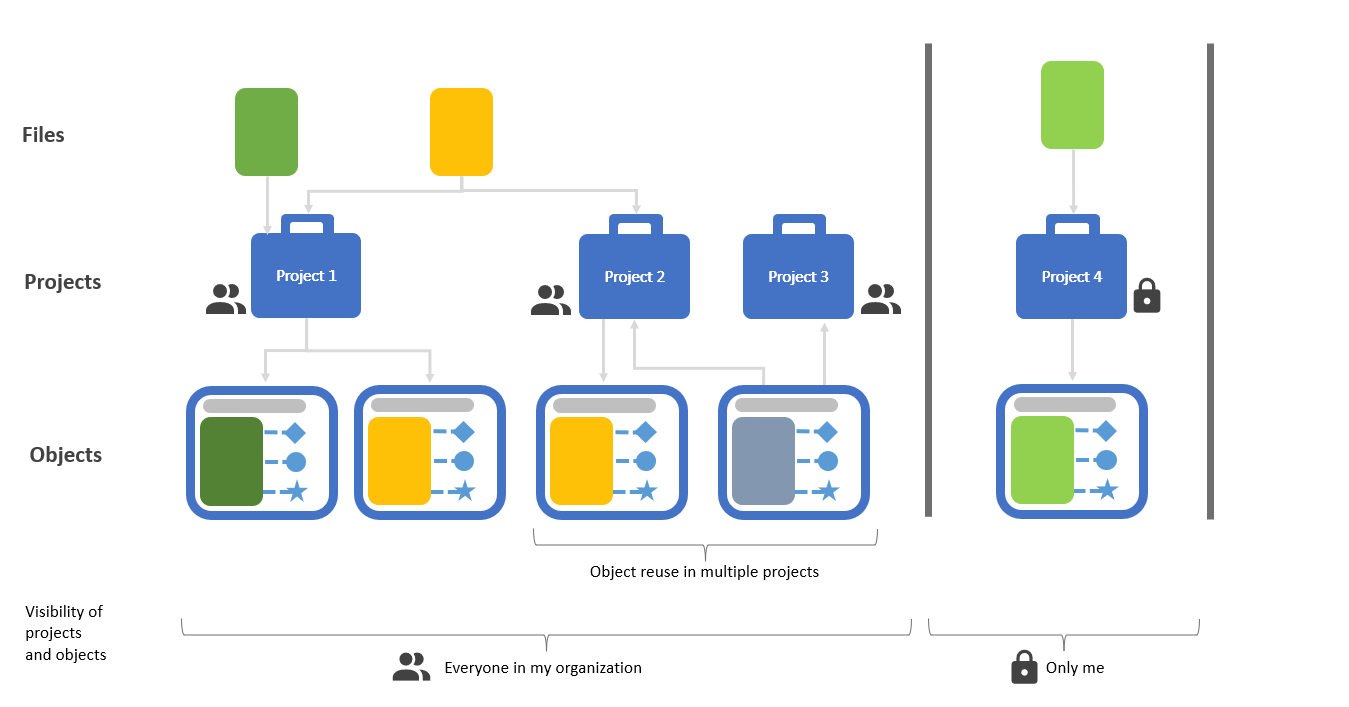
If you want to use the plusmeta AI to analyze content, you need to create a project first. In the project, you upload the files to be processed or reuse them from already created projects.
The steps in the project are determined by the workflow on which the project is based.
Projects can have different levels of visibility. For more information, see the help page Set visibility.
Further information on projects:
- All projects created can be found in the projects view.
- An overview of all important topics concerning projects can be found on the help page Overview: Projects
Workflows
A workflow is a template for projects. The workflow determines what happens in the project, i.e. which steps are performed and what the result is at the end of the project. For every use case there is a suitable workflow in plusmeta. Enterprise customers can also have company-specific workflows designed.
For more information on workflows:
- You can see which workflows are available to you in the workflows view
- An overview of all help pages on the subject of workflows can be found in the workflows overview
Objects
When you upload files for processing in a project, plusmeta stores each file in an object. The object encapsulates the file. The file itself remains unchanged. The metadata detected in plusmeta is saved to the object. Depending on the file type, plusmeta assigns the object to an object type. For example, PDF files are identified as Document , HTML files are classified as Content component. The results of the workflows are also objects, e.g. ML models or iiRDS packages. plusmeta also offers other object types, most of which are relevant for configuration purposes. Objects can have different levels of visibilitiy. For more information, see the help page Set visibility.
Further information about objects:
- For detailed information on objects, see the help page Objects.
- For information about the Objects view, where objects are saved, see the help page Object view
- To learn how to upload objects to projects, see the help page Workflow step: Add objects
- You can learn about the difference between the display name and the title of an object on the help page Display name and title
Metadata and other properties
When you upload files and plusmeta creates an object for each file, an initial analysis is performed. Existing metadata is imported, if its known to plusmeta. In many workflows, this is followed by the Extract metadata workflow step. Here, the plusmeta AI analyzes the documents and suggests suitable values for the metadata.
Metadata are special kinds of properties. Properties play a central role in plusmeta. For example, attributes and relations are also properties. Another example is the use of properties in the configuration of plusmeta.
More information about metadata and properties:
