Content of this topic
Overview
Properties fulfill many purposes in plusmeta. From individual configurations to basic system functions. What a property does depends on various factors:
- Its class
- Its system role(s) and associated attributes and relations
- Its data type
The main types of properties that you will encounter most often are:
- Metadata
- Relations and
- Attributes
Classes
The class of the property is its parent property. Properties are arranged hierarchically in plusmeta.
A property becomes a class when it is assigned the data type Class.
Properties are therefore primarily organized hierarchically via classes. However, classes can also determine the type of property: For example, to create an attribute, you assign a property to the class Attribute.
In the case of metadata, the hierarchical structure of the metadata is created via the class.
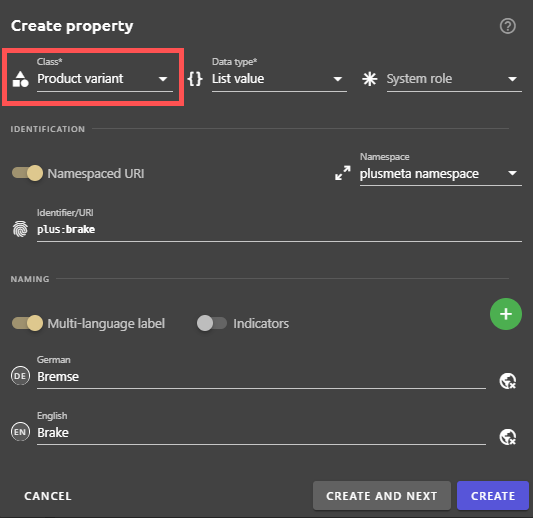
The example screenshot shows the Create property dialogue. A new metadata value Brake has been created here, which is hierarchically below the metadata Product variant.
In the Create property dialogue, any property can be selected as a class that has the data type class.
System roles
System roles give you a wide range of options for setting what your property should be used for. Three examples of system roles are: The roles Metadata, Title property, and Identity.
- The system role Metadata turns a property into metadata. Several attributes and relations are linked to the role Metadata, with which the metadata can be individually configured.
- The system role Title property turns values of the property into title candidates for the display name and title of objects. Examples of this are the HTML and PDF titles.
- The Identity system role allows objects and metadata to be assigned alternative identities. To do this, a property that has the Identity system role is assigned to metadata or an object.
It is possible to assign multiple system roles to a property. This can be useful, for example, for metadata that is also used as an alternative identity for an object.
You can find out more about system roles in plusmeta on the System roles help page.
Data types
The following data types are available in plusmeta:
- Array
- Boolean value
- Class
- Relation
- List value
- Number
- Object relation
- Project relation
- String value
- Taxonomy
- Text (long)
- Timestamp
Most of these data types are used for system properties and individual features. The data type defines the permitted content of a property. For attributes, for example, the data type can be used to specify whether it is a numerical value (e.g. for priorities) or a string value (e.g. for complex identities).
For the configuration of metadata models, you will generally only need the data types Class, List value and Relation. These three are therefore briefly described below.
Data type: Class
This data type turns a property into a class, with the help of which properties can be structured hierarchically. As soon as a property is assigned the Class data type, it appears in the Class drop-down list for other properties and can be selected as a higher-level property.
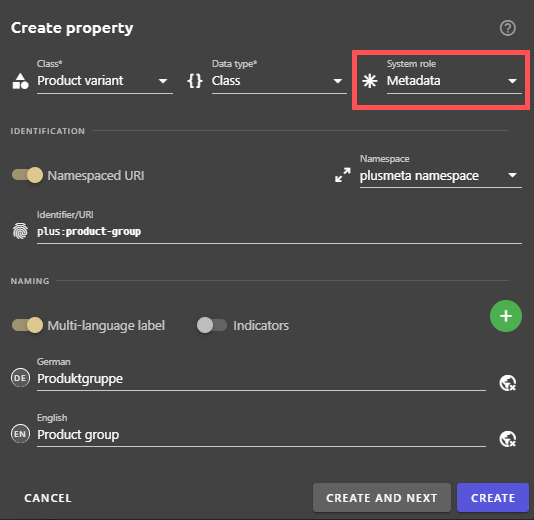
Example: If you want to create a new metadata Brake type, you must select the value Class from the drop-down list Data type in the Create property dialogue. From the Class drop-down list, select the metadata above it in the hierarchy. If brake type is to be placed hierarchically at the top level in your metadata model, select your metadata model as a class. Alternatively, you can also select the Metadata system property as a class. In order for plusmeta to interpret your new property as metadata, you must also assign it the system role Metadata. You can find out more about this in the section System roles.
Data type: List value
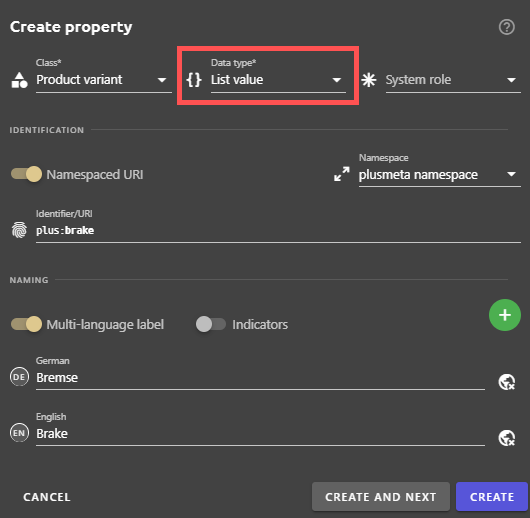
The List value data type turns a property into a value from a list. The list in which the value belongs to is determined by its class. This data type is used in particular for metadata values.
Example: If you want to add your own metadata values to the iiRDS metadata Product variant, then select the data type List value and the class Product variant for the properties created. This allows you to create values for the Product variant metadata. The metadata Product variant therefore has the data type Class, the metadata values have the data type List value. This example can be seen in the two screenshots above. The Brake property from the example screenshot can now be automatically extracted as a metadata value of the Product variant metadata or assigned manually.
Data type: Relation
The Relation data type enables the use of a property as a relation. Relations are needed for many things in plusmeta.
Examples of this are:
- Relations that assign metadata to an object.
- Relations between metadata by which metadata can be assigned via so-called relational knowledge.
- Relations that assign other properties to a property, such as a system role.
- Relations that assign objects to projects.
For the configuration of a metadata model, you will need the first two types of relations in particular.
You can find out more about relations in plusmeta on the Relations help page.
